
UX writing principles for digital products
UX writing connects the language in a product with the task someone wants to complete. That relationship also gives AI orchestration its starting point.
When someone uses a digital product, they usually have something they want to achieve. They might be applying for a service or changing information already held about them. The words in the interface help them understand what to do and what will happen as a result.
Those words need to work together throughout the task. A form asks questions, and the feedback helps someone understand whether their answers have been accepted. A confirmation prompt gives them a chance to reconsider a decision. A success message explains what has happened afterwards. Each piece of content has a purpose within a wider interaction.
This is why UX writing needs a shared system. Teams need to agree how different kinds of content support the experience, and how their decisions will be applied across the product. That system can then support an AI workflow, with clear instructions about what to produce and how to review it.
The task gives the content its purpose
Before deciding how to phrase a message, we need to understand what the person is trying to do. We also need to understand what they already know. Someone using a service for the first time may need an explanation that an experienced user would find unnecessary.
Research helps us understand those differences. A persona can bring relevant findings together, including the person’s goals and the circumstances in which they use the product. Its value comes from what it tells the team about the task. Demographic details alone cannot explain why someone might struggle with a particular interaction.
In our training, we connect this understanding with clarity, concision, consistency, support for action and an appropriate brand voice. These principles help us discuss the decisions behind the words. Concision, for example, means considering how much explanation someone needs at that point. Removing a useful explanation may make the task harder, even when the message becomes shorter.
A system that supports user tasks
Once the task is understood, a UX pattern helps us consider how the interaction should work. The GOV.UK Design System describes patterns as “best practice design solutions for specific user-focused tasks and page types”.[1] Patterns bring together decisions about how to support a task, including the content and interface components it needs.
For example, a product may need to help someone avoid losing work when they close an application. The interaction needs to give them a chance to understand the consequence and decide whether to continue. A confirmation prompt can provide the communication needed at that moment.
This brings us to content types. A content type groups messages that share a purpose, such as asking someone to confirm a decision or explaining an error. Understanding that purpose helps us decide what the message needs to achieve before we start drafting it.
Forms
Forms ask for information that a service needs. We can think of form content as a conversation: the service asks questions, the person answers, and the service responds. The questions and feedback need to make sense together, including when someone is unsure or something goes wrong.
Confirmation prompts
Confirmation prompts give someone an opportunity to reconsider before an action takes effect. Their purpose is to make the decision and its consequences clear while the person can still change their mind. This creates a deliberate pause in the interaction.
Success messages
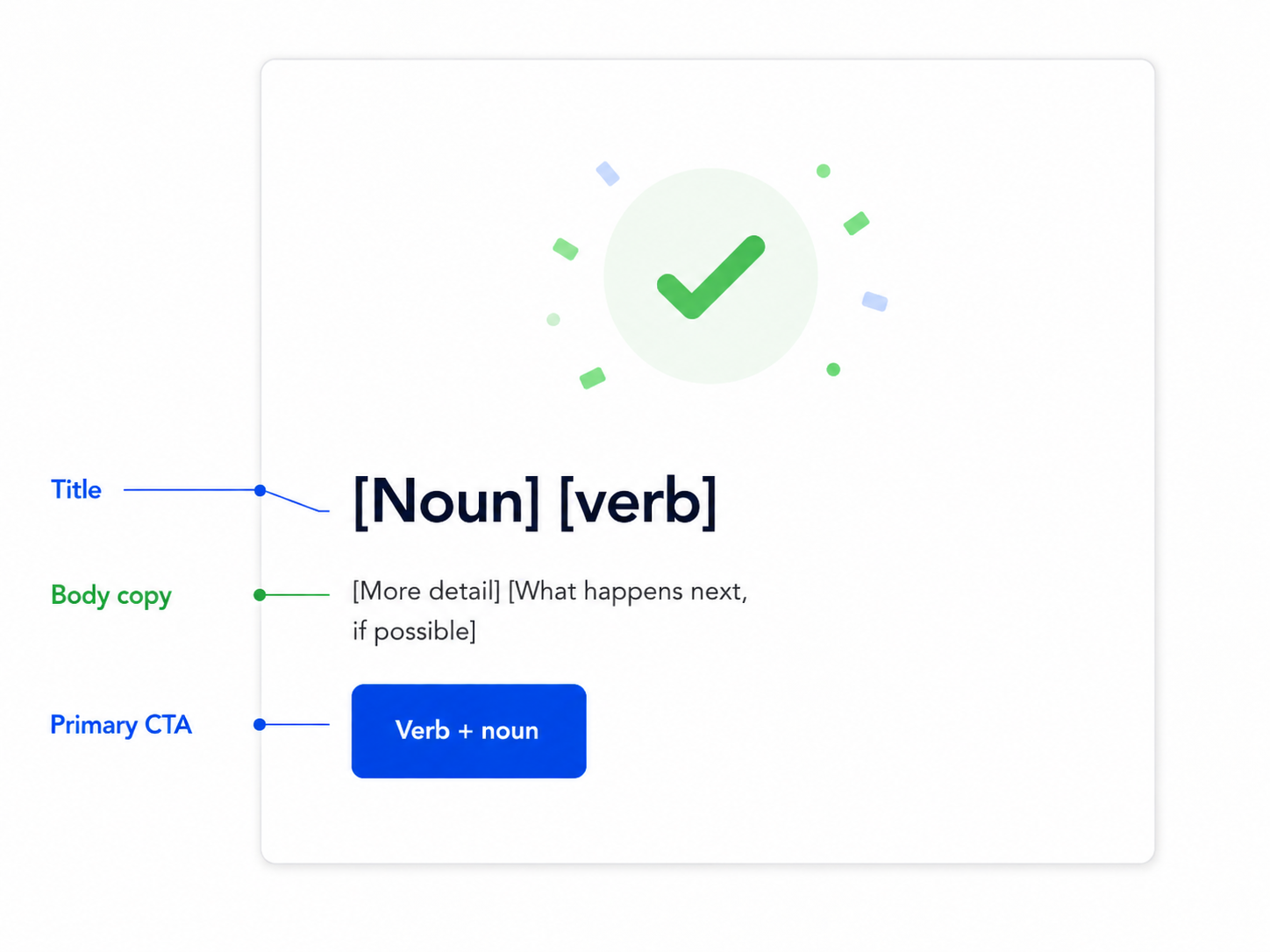
Success messages tell someone that an action or task has been completed. They help the person understand what has changed and whether there is anything else to do. The content needs to reflect what the product has actually achieved.
Empty states
Empty states explain why an area has no content to show. Someone starting for the first time has different needs from someone whose search returned no results. The explanation depends on that context and on whether the person can do anything to change the situation.
Error messages
Error messages explain a problem affecting the task. An answer that needs correcting creates a different situation from a service failure. That difference matters because it changes what the person can do and what the service needs to take responsibility for.
The words and the interface work together
Within each content type, content elements do different jobs. A heading introduces the message, while body copy supplies any explanation. Action labels describe the choices available to the person. These are sometimes called calls to action, or CTAs.
The interface component provides the structure in which that content appears. A dialog, for example, can contain the heading, explanation and action buttons for a confirmation prompt. Nielsen Norman Group’s guide to design systems explains how reusable components and patterns support shared design decisions.[2]
Returning to the unsaved work, the content type is a confirmation prompt. Its content elements need to explain the decision and the consequences of the available choices. The dialog brings those elements together at the point when the person needs to decide.
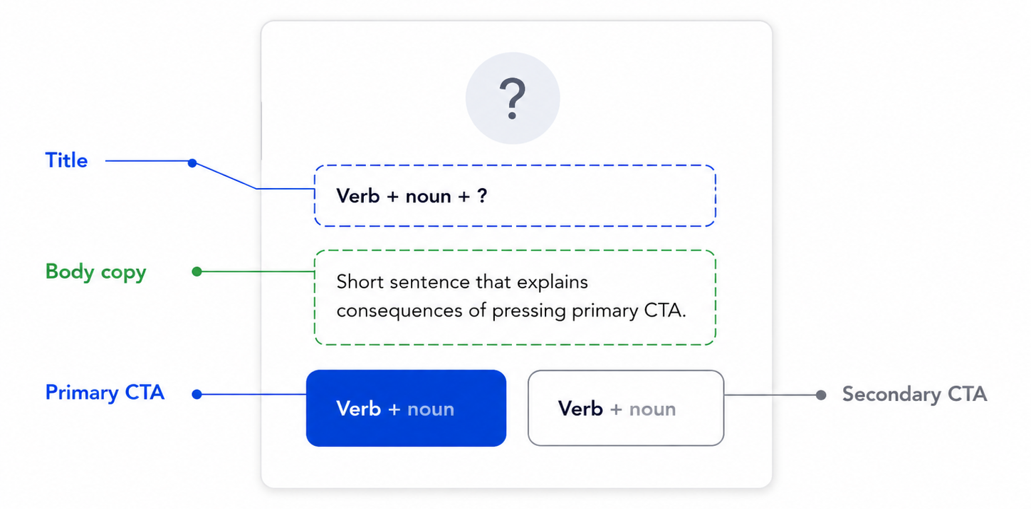
In this confirmation dialogue, the title is a question that whether the person wants to save changes. The body copy is an explanation of the consequences of taking the primary call-to-action. The buttons are call-to-actions, with a primary and a secondary option.
It’s useful to discuss content types as agnostic to the design component. A success message might be a small notification on a web, or a snackbar or toast in an app. Mapping a content type to a dsign component is a decision about experience, platform, device and language.
Shared guidance connects decisions across the product
Once these relationships are clear, teams can record decisions that apply across similar situations. Guidance for confirmation prompts can explain their purpose and how the content elements work together. A terminology list can record agreed names for actions, while tone guidance helps writers respond appropriately to the situation.
This gives writers and reviewers a shared basis for their work. They can reuse decisions while considering differences in the task or audience. When research reveals a problem, the team can also examine other messages that follow the same guidance. The finding can improve the system as well as the individual message.
How AI orchestration uses this system
A shared content system gives AI something useful to work with. The brief can identify the user’s task and the type of message required. Approved product information establishes what the message can say, while the guidance explains how its content elements should work together.
Orchestration connects the stages of an AI workflow, including the information passed between them and the checks that determine what happens next. For UX writing, we can organise that process around the content system.
Consider a confirmation prompt asking a user if they wish to save their progress before exiting an app. Before drafting, the workflow needs reliable information about what closing the application actually does. Does it save the work? Is all work lost? Are unsaved changes lost? Our workflow needs to have information about the product at that time. . If those facts are missing and cannot be found, the next step needs to be human intervention.
With those facts established, AI can draft the required content elements using the agreed guidance. A checking stage can flag missing elements or terminology that differs from the approved wording. The draft and those findings can then reach a reviewer together, with the source information available for comparison.
The orchestration defines how this work moves between stages. It establishes when a draft is ready for review and when a question needs to return to a product specialist. The team can examine a specific output alongside the instructions and information used to produce it. This gives them a clearer basis for finding and correcting problems in the process.
What else to think about?
So, content systems are important as is AI orchestration for UX Writing. But truth be told, that’s all a given. In the same breath, we need to also think about user research for task completion, accessibility for disabled users, and advanced monitoring-and-evaluation programmes to truly look at impact.
Different research questions therefore need different approaches. Discovery research helps us understand people’s needs before writing begins. Terminology research explores which words people recognise and understand. Testing the interaction investigates how the content supports progress, while comprehension research examines what people take from the explanation.
UX writing support from Narratology
Our UX writing training helps teams understand UX Writing strategically, and apply best practices to their own product content. Where AI supports the work, we help teams define the guidance and review points around it. We also train how to research with users in a strategic way.
Our product copy review checklist provides a starting point for reviewing content online. Contact Narratology to discuss UX writing training or a review of your product content.
References
[1] GOV.UK Design System team. Patterns. GOV.UK Design System. Accessed 17 October 2026. https://design-system.service.gov.uk/patterns/
[2] Fessenden, Therese. Design systems 101. Nielsen Norman Group. Published 11 April 2021; reviewed 27 August 2026. https://www.nngroup.com/articles/design-systems-101/
[3] Anthropic. Building effective agents. 19 December 2024. https://www.anthropic.com/engineering/building-effective-agents
[4] W3C Web Accessibility Initiative. Accessibility, usability and inclusion. Updated 6 May 2016. https://www.w3.org/WAI/fundamentals/accessibility-usability-inclusion/
[5] Component illustrations and confirmation example: Narratology. UX writing patterns. Session 2, slides 20, 22 and 32. Training materials.
About Frances Gordon
Frances Gordon is Director of Narratology and UK Ambassador for PLAIN. She contributes to plain language standards through the British Standards Institution.
Her work focuses on clear communication in regulated environments, accessibility and financial inclusion. Read Frances's profile.