
Writing clear confirmation messages
Write confirmation messages that explain the action and its consequence. Use specific button labels and give people a clear way to keep their current choice.
A confirmation message appears at a moment when somebody needs to decide whether to go ahead with an action. They may be about to remove information, cancel an instruction or make a change they cannot easily reverse. The message needs to make the choice and its consequences clear before they commit. Reviewing it therefore begins with understanding what the product will do in response to each option.
Our product copy checklist connects the title, explanation and buttons so they support the same decision. The title identifies the action, the body explains its consequence and the controls make the available choices clear. This structure gives a team a practical basis for review. The wording still needs to reflect the particular action and the state the system has reached.
Name the action in the title
A title such as 'Are you sure?' requires the person to recall what they selected. It gives them little help checking the decision. An illustrative title such as 'Cancel scheduled transfer?' identifies the action. The person can then compare it with what they intended to do. Use the same terminology in the title and the action button. Changing from 'cancel' to 'remove' may introduce an unnecessary question about the difference.
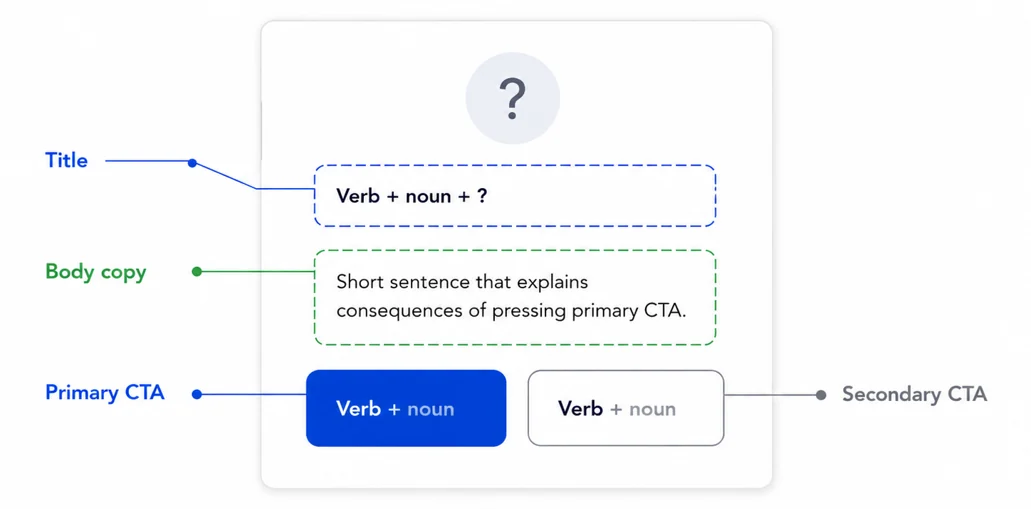
The diagram shows the relationship between the title, explanation and choices. The written example below applies that structure to a specific action.
Explain the consequence before the choice
For a scheduled transfer, an illustrative message could use this wording:
Cancel scheduled transfer?
We will not send this transfer if you cancel it.
The primary button could say 'Cancel scheduled transfer'. The other button could say 'Keep scheduled transfer'. This example assumes that the product can still cancel the transfer. The team must establish what is possible before approving the message. If the action affects a fee or another commitment, the explanation needs to cover that consequence. Do not imply a refund unless the process provides one.
Make the alternative unambiguous
A second button labelled 'Cancel' can be confusing when the main action is also cancellation. The user may be unsure which action it cancels. Name what the alternative will do. In the transfer example, 'Keep scheduled transfer' explains that the existing instruction will remain. 'Yes' and 'No' can require similar interpretation. Specific wording helps people check the choice against the action they intend.
Give enough detail to distinguish the item
If someone has several scheduled transfers, the message may need to identify the one affected. Use only the relevant details and present them consistently. The same applies to deleting a saved payee or withdrawing an application. Establish what the person needs to distinguish before choosing the wording. Avoid adding internal processing details that do not help the decision. Add them when they explain a consequence or a practical limit.
Confirm what actually happened
After the person acts, the feedback needs to match the system's state. A request received is different from an action completed. If cancellation is still being processed, explain that state and what happens next. Do not announce completion before the process has reached it. Keep the terms consistent across the confirmation and the later feedback. A person should be able to follow the same action through the journey.
Test the whole interaction
Our guide to UX writing principles and AI workflows places confirmation messages within the wider work of designing product content.
How Narratology can help
We review product messages in the context of the customer journey. Our work covers the wording, the choices presented and the feedback customers receive.
Discuss a content or UX writing review.
About Frances Gordon
Frances Gordon is Director of Narratology and UK Ambassador for PLAIN. She contributes to plain language standards through the British Standards Institution.
Her work focuses on clear communication in regulated environments, accessibility and financial inclusion. Read Frances's profile.